
Departments that keep retail honest
Items live in departments — Food, Beverage, Merchandise, Services — with categories inside each. A polo and a hot dog never blur together in the shift report.
Every item carries its SKU, price, cost and tax rate, and every unit that moves — received, adjusted, sold or transferred — is on the record. Retail, the bar and the online store all draw down the same live number.
The item catalog is the single source every screen sells from. Set an item up once — SKU, price, cost, tax rate, department, variants — and the registers, tablets, carts and the online store all inherit it.
Items live in departments — Food, Beverage, Merchandise, Services — with categories inside each. A polo and a hot dog never blur together in the shift report.
Every item carries its SKU, retail price, unit cost and tax rate. Margin isn’t a spreadsheet you build in January — it’s on the item the day you sell it.
Sizes and options ride as modifiers on one parent item instead of a dozen near-duplicate SKUs — the same mechanism the kitchen uses for toppings runs S/M/L/XL on a quarter-zip.
Every sale decrements the count in real time — whether it rang at the pro-shop register, on a tablet, at the bar or from the online store. One number, not four.
Mark an item “86” and it flips at every station at once. A stock-tracked product that hits zero drops out of the member-facing online catalog on its own.
Starting a cart shift deducts the load-out from main inventory; sales draw the cart’s own stock down live, and end-of-day reconciliation returns what came back. The course stops being a black hole in the count.
Checkout, member charging by name or NFC tap, discounts, voids and shift reports are the same machinery every register in the building runs — covered in full on the Point of Sale page. This page is about what’s on the shelves behind it.
Four things can happen to stock — it’s received, adjusted, sold or transferred — and ClubCore writes each one to a movement audit trail. When a count is off, you trace it; you don’t argue about it.
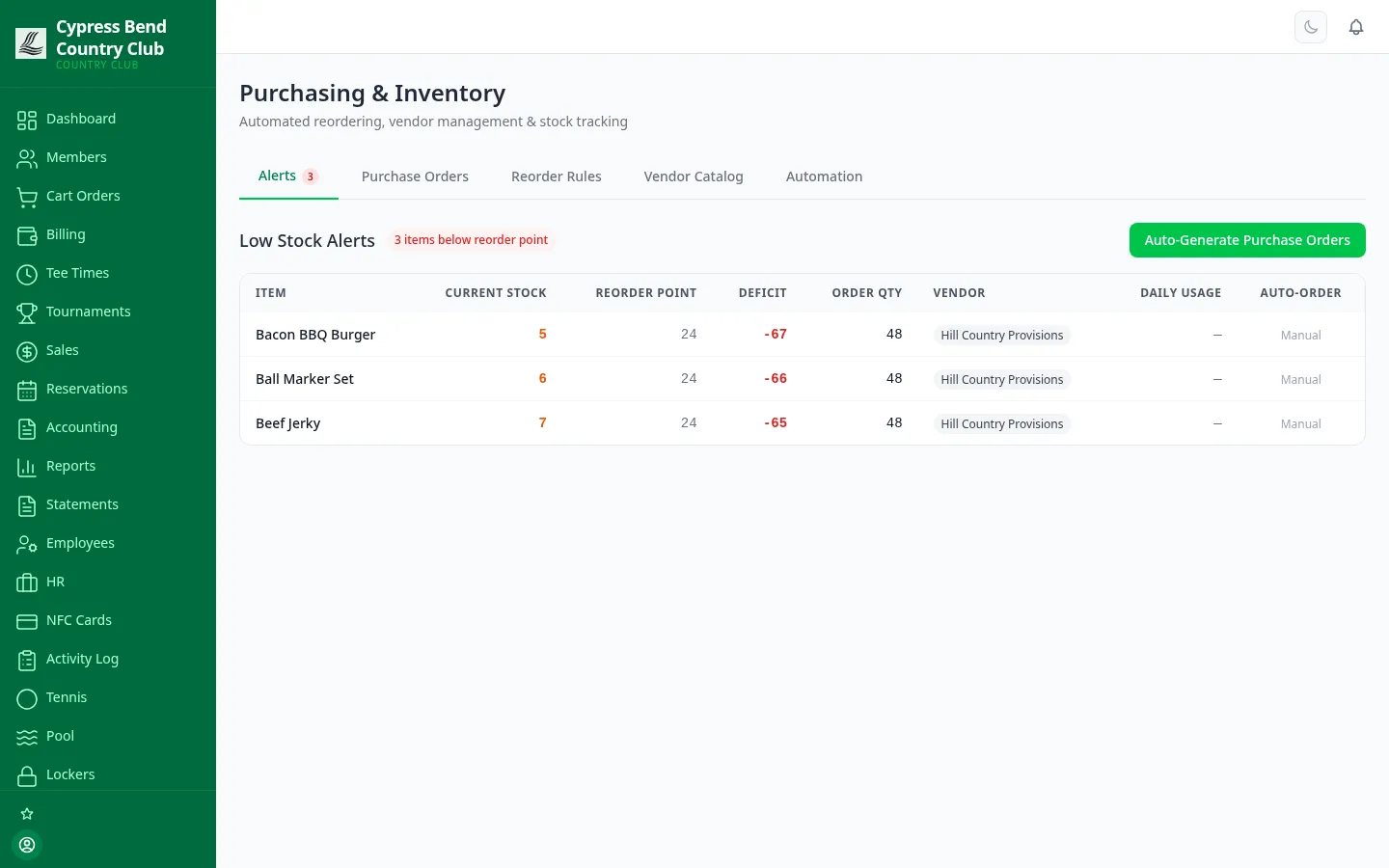
Give any item a reorder rule — the low-stock threshold, how much to order, and where from — and the Alerts tab badges everything that’s fallen below it. Purchase orders are auto-numbered and move through a controlled lifecycle: draft → submitted → received. A PO can’t skip submission, can’t be received twice, and received quantities can’t exceed what was ordered — the guardrails are in the workflow, not in someone’s memory.
Prefer hands-off? The Automation tab runs the whole loop — scan stock against the rules, draft POs for everything that triggered, submit, receive, and generate the vendor bills — while you watch it happen instead of typing it.
The screen you want to see. When every item is above its reorder point, Purchasing says so — and when one isn’t, it’s already counted, badged and one click from a drafted PO.
Flip one switch and a staff-curated storefront appears in the member portal — the same inventory, sold while the shop is closed, charged to the member account like everything else at the club.
Members can cancel on their own while an order is still pending or confirmed — after that it’s being prepared, and the portal tells them to call the shop. Pickup at the club or shipped to their door, their choice.
The storefront only shows what the pro shop puts in it. Link a product to a POS inventory item and its stock is tracked automatically — or list it as a special order, made to order and always available.
Members browse from the portal, pick quantities, and choose pickup at the club or shipping to an address. The total charges straight to their member account and shows on their statement — no card form.
Orders arrive as pending and advance click by click through confirmed, ready and fulfilled. Cancelling an order refunds the member and puts tracked stock back on the shelf — automatically.
The online store is a feature toggle in Settings — turn it on and the shop section appears in the member portal; turn it off and it disappears. Products are deactivated rather than deleted, so seasonal merchandise comes back with its history intact.
The stuff you don’t sell — carts, mowers, kitchen equipment — gets the same discipline as the stuff you do. Every asset carries a tag, a category, a location, its hours and miles, and a service history.
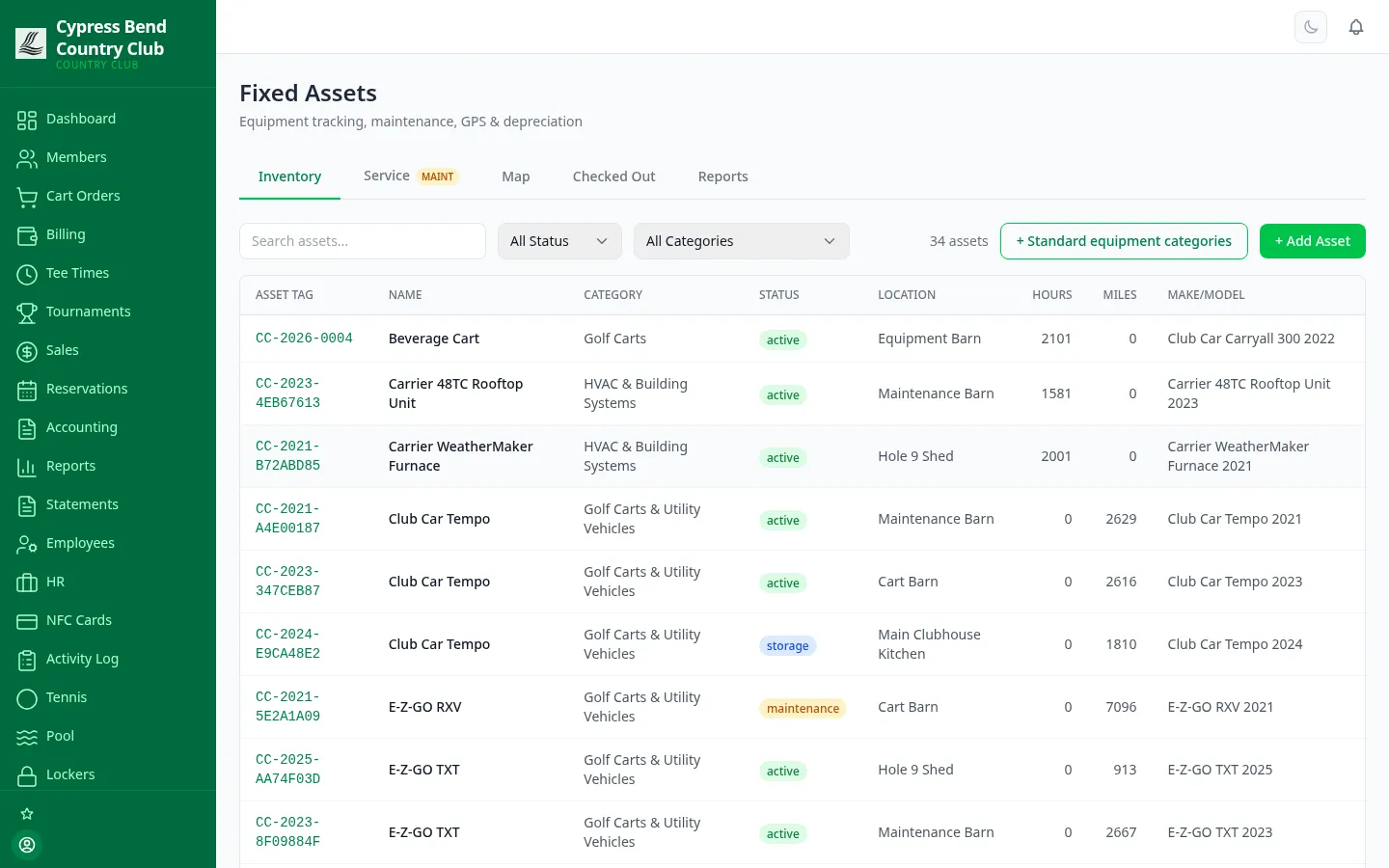
Tagged assets show their status, location, engine hours and mileage at a glance, with purchase and warranty info on the record and maintenance logged against each machine. Check equipment out to people, see it on a map, and run depreciation reports off the same register — so the asset schedule your accountant asks for already exists.
Inventory, purchasing, the online store and asset tracking are all part of the platform — see plans on the pricing page, with no per-module surprises.
We'll hand you a personal sandbox seeded with a full club — menu, members and three years of books — then walk your team through it.
Prefer email? [email protected] · ClubCore by Atlas Core Technologies, New Braunfels, Texas